
Quick Start
Get Reviewflow running in 5 minutes.
Prerequisites
- Node.js 20+
- A GitLab or GitHub account with webhook access
- Claude Code CLI installed and authenticated
1. Install
As a user (recommended)
npm install -g reviewflow
# or
yarn global add reviewflowYou can also run it without installing:
npx reviewflow startAs a contributor
git clone https://github.com/DGouron/review-flow.git
cd review-flow
yarn install
yarn build2. Initialize
Run the interactive setup wizard:
reviewflow initThe wizard walks you through:
- Choosing your platform (GitLab, GitHub, or both)
- Entering your username(s) for @mention filtering
- Scanning for local repositories to register
- Generating webhook secrets automatically
Your configuration is saved to your platform config directory — on Linux ~/.config/reviewflow/config.json and ~/.config/reviewflow/.env (macOS: ~/Library/Application Support/reviewflow/, Windows: %APPDATA%\reviewflow\). Set XDG_CONFIG_HOME to override.
Non-interactive mode
Use reviewflow init --yes to accept all defaults. You can also pass --scan-path /path/to/projects to target specific directories.
Add repositories later
Use reviewflow discover to scan for and add new repositories to your existing configuration.
Full setup wizard
reviewflow init only writes configuration. For a guided end-to-end setup that also checks dependencies, signs you into Claude, installs the background daemon, and registers your project, run:
reviewflow setup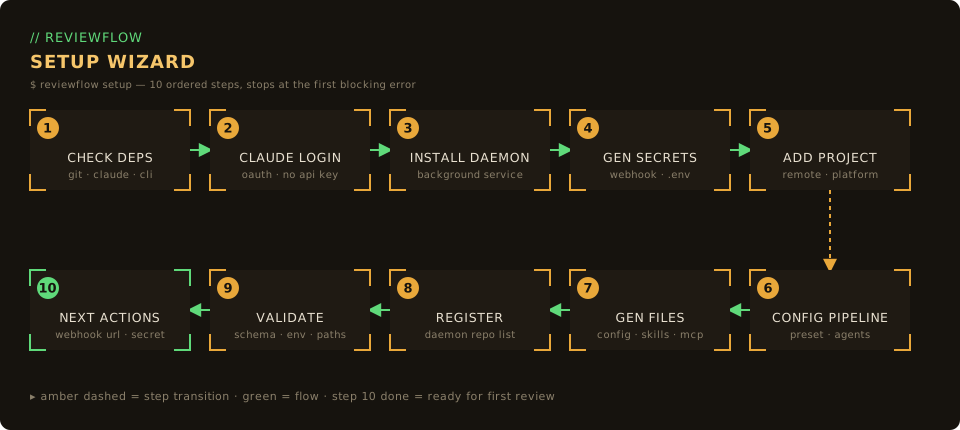
The wizard runs ten ordered steps and stops at the first blocking error:
- Check dependencies — verify
git,claude, and the platform CLI (glab/gh) are installed - Claude login — confirm an authenticated
claudesession (OAuth, never an API key) - Install daemon — set up the ReviewFlow background service
- Generate secrets — create webhook secrets and the
.envfile - Add project — detect the git remote and target platform
- Configure pipeline — pick a review preset (
backend,frontend,fullstack,basic, orcustom) - Generate files — write
.claude/reviews/config.json, the review skills, and.mcp.json - Register project — add the project to the daemon's repository list
- Validate setup — run final checks across schema, environment, paths, and remotes
- Display next actions — print the webhook URL and secret to finish configuration
| Flag | Purpose |
|---|---|
--path <dir> | Target project directory (defaults to the current directory) |
--json | Emit a JSON event stream and read answers from stdin (non-interactive) |
--force | Overwrite existing project files (backs up the previous config.json) |
--yes | Accept suggested defaults without prompting |
--ai | Enable AI-assisted fallback for ambiguous prompts |
--show-secrets | Print full secret values instead of masking them |
3. Configure webhook
GitLab
- Go to your project → Settings → Webhooks
- Add webhook:
- URL:
https://YOUR_TUNNEL_URL/webhooks/gitlab - Secret token: (shown during
reviewflow init, or runreviewflow init --show-secretsto view) - Trigger: ☑ Merge request events
- URL:
- Click Add webhook
GitHub
- Go to your repo → Settings → Webhooks
- Add webhook:
- Payload URL:
https://YOUR_TUNNEL_URL/webhooks/github - Content type:
application/json - Secret: (shown during
reviewflow init, or runreviewflow init --show-secretsto view) - Events: ☑ Pull requests
- Payload URL:
- Click Add webhook
Expose for webhooks
GitLab/GitHub need to reach your server. Use a tunnel:
# Cloudflare Tunnel (recommended)
cloudflared tunnel --url http://localhost:3847

# Or ngrok
ngrok http 38474. Start & verify
# Start the server
reviewflow start

# Or as a background daemon
reviewflow start --daemon

# Open the dashboard automatically
reviewflow start --openThe server runs at http://localhost:3847 (or your configured port).
Verify your setup
# Check configuration is valid
reviewflow validate

# Check server status
reviewflow status5. Test it!
- Create or open a Merge Request / Pull Request
- Assign yourself as Reviewer
- Open
http://localhost:3847/dashboard/ - Watch the review appear!
Where reviews actually run
On first review of each MR, Reviewflow creates a dedicated git worktree at ~/.reviewflow/worktrees/<platform>-<slug>-<mrNumber> and dispatches claude --bg against it. Your main checkout is never touched. Followups fast-forward the existing worktree; merge/close removes it; a daily sweep reclaims anything stale. See Worktree Lifecycle.
Next steps
- Project Configuration - Configure review skills per project
- Deployment Guide - Run in production with systemd
- Architecture - Understand the codebase
- Worktree Lifecycle - How review isolation works
Troubleshooting
See Troubleshooting for common issues and CLI diagnostics.